 Labs
01 / 21
Labs
01 / 21
Beyond
the chat
Designing typed AI workflows with Pydantic AI
Brian Newman · Newman Labs

- 45 seconds. Start from ChatGPT, Claude, or Copilot. That is the chat box people already know.
- Say: in that box we supply the context, judge the answer, and decide what happens next. Today I want to put the same kind of model inside an ordinary Python application, where it does one bounded job.
- Point at the strip under the photo: invoice PDF, Pydantic AI, typed object. Pydantic AI is the Python layer in the middle. Claude, GPT, or another model can sit underneath it.
- Then click. Save the name unpack for the Pydantic AI slides.

Brian Newman
Python, data engineering, and applied AI
I build software for real business workflows.
 Portfoliobriannewman.info
- 60 seconds, bio only. Save the stack details for later slides.
- Say: I lead data engineering and development at Cotton Holdings, a disaster restoration company, so most of my Python runs in production. Newman Labs is where I publish this work in public instead of leaving it inside a corporate POC.
- Point at the QR code and briannewman.info. Worth saying plainly that I am a practitioner rather than a Pydantic maintainer or a researcher.
- Leave on the setup question, then next slide: in an AI workflow, who owns the loop?
The central shift
Who owns the loop?
Chat interface
The human drives the loop
- Ask or paste context
- Read the answer
- Judge whether it is useful
- Prompt again or take action
Workflow interface
The application owns the sequence
- A business event occurs
- The model interprets ambiguity
- Python validates the result
- The workflow returns explicit state
- 90 seconds. This is the thesis slide, so read the two columns and move on.
- Say: chat works because you are the orchestrator. You prompt, you judge the answer, you decide what happens next. In a workflow the application owns that loop: a business event arrives, the model interprets the ambiguity, Python validates the result, and an explicit state comes back.
- Point at the left column as ChatGPT, Claude, or Copilot: you are still the orchestrator. Point at the right column as the claim for the rest of the talk: the application owns that loop.
- Click. The audience poll belongs on the next slide.
Use the right tool
Automation is exact. Inputs are not.
Rules, calculations, required fields, database lookups, and repeatable actions.
PDFs, emails, tickets, contracts, photos, notes, and inconsistent language.
Map ambiguity into a typed object that deterministic code can use.
Use the model for interpretation. Keep exact work in Python.
- 90 seconds. This is the only place I poll the room.
- Ask who runs pipelines or automations built from API calls and Python steps, then pause about two seconds for hands.
- Say: that approach works well when the inputs are already clean. The hard part has always been PDFs, emails, tickets, and notes somebody wrote for another person.
- Say: use the model to turn that mess into a typed object, and keep the calculations, lookups, and side effects in Python. The next slides are how I wrap that model call in Pydantic AI instead of living in the chat box.
- Click without rebuilding the chat versus workflow argument.
Working definition
A typed application boundary around a model call
Pydantic AI is the engineering layer around how Python calls, validates, retries, tests, observes, and composes model behavior.
- 75 seconds. Connect the name to what they already know, then keep moving.
- Say: if you have used Pydantic to validate JSON in Python, that is the same family. Pydantic AI is their agent framework. It is not Anthropic. Anthropic is Claude, the model I can still call underneath. OpenAI and Copilot sit in that same model slot.
- Say: what Pydantic AI adds is the typed application boundary around that call: output, retries, dependencies, tools, tests, and traces. LangChain covers similar ground. Microsoft Foundry does too if you live in that stack. I picked this one because I already trusted Pydantic for typing and already ran Logfire on FastAPI.
- Point at the five numbered items. The next slide is whether you need a framework at all.
Optional abstraction
Direct model calls are still valid
Direct
Python → provider SDK → model
Good when the interaction is small and the provider response is already the application boundary.
With Pydantic AI
Python → agent contract → provider → model
Useful when the model call needs typed output, validation, retries, tests, tools, dependencies, or traces.
Swap the model string. The Agent contract stays.
- 70 seconds. This slide gives people permission to skip the framework, then names why it is still useful.
- Say: if you already call the Claude SDK or the OpenAI SDK, that is still a good design. Those providers now support structured output themselves. I would not add another layer without a reason.
- Say: I reach for Pydantic AI when I want a durable Python contract around validation, retries, tools, dependencies, tests, and traces, while still using Claude or GPT as the model.
- Ten seconds: the Agent contract stays the same when you swap the model string. Point at the callout, then click through to the Agent.
The primary interface
An Agent configures one model interaction
SupportDecision(category="billing")- 75 seconds. Four nouns and then move; this is not an API tour.
- Say: an Agent here is a configured model runner rather than an autonomous application. The model generates, the instructions describe the job for this run, the output type is the Pydantic object that has to come back, and a tool is a Python function the model can request while Python still executes it.
- Point at the four boxes around the Agent.
- Instructions versus system prompt is an optional aside on the next slide, so skip it unless somebody asks. Click: we start from the output the application needs rather than the prompt.
Structured output
Define the object before writing the prompt
The application needs an invoice object, not prose that happens to look like JSON.
class ParsedInvoice(NewmanLabsModel):
    invoice_number: str = Field(min_length=1, max_length=100)
    issue_date: date
    purchase_order_number: str | None = Field(default=None, max_length=100)
    currency: str = Field(pattern=r"^[A-Z]{3}$")
    seller: InvoiceParty
    subtotal: Decimal | None = None
    tax_total: Decimal | None = None
    total: Decimal = Field(
        gt=0,
        description="Final total printed on the invoice.",
    )

class InvoiceAgentOutput(NewmanLabsModel):
    invoice: ParsedInvoice
supplier_match: SupplierMatch | None = None- 75 seconds. Do not read the class line by line.
- Say: define the object before writing the prompt, because downstream code needs an invoice, not prose shaped like JSON. Currency is three letters, total is a positive Decimal, and the optional fields are explicit.
- Point at ParsedInvoice, then at InvoiceAgentOutput wrapping the invoice plus an optional supplier match.
- One line before clicking: a valid structure is not the same thing as a correct read. That comes back after the demo.
Agent contract
Configure behavior without hiding the application
Instructions describe the current job. Dependencies provide typed per-run context. The output type defines what must come back.
invoice_extractor: Agent[SupplierLookupState, InvoiceAgentOutput] = Agent(
    name="invoice_parser",
    deps_type=SupplierLookupState,
    output_type=InvoiceAgentOutput,
    instructions=(
        "Extract invoice fields from the document. "
        "Use only values explicitly shown. "
        "Call search_supplier_candidates exactly once..."
    ),
    retries={"tools": 3, "output": 3},
)- 70 seconds. Walk the constructor top to bottom and stop there.
- Say: this is configuration rather than a hidden application. The name makes the run easy to find in Logfire, deps_type carries per-run context, output_type is InvoiceAgentOutput, the instructions tell the model to use only values printed on the document and to call the supplier tool once, and retries cap tool and output failures.
- Point at name, deps_type, output_type, instructions, retries. No need to re-explain what an Agent is.
- Optional if the room is ahead of schedule: a system prompt matters when reused message history has to keep stable system context. This workflow is stateless, so instructions are enough. Then click to validation.
Output validators + ModelRetry
Validation can send focused feedback back to the model
expected_total = (
    invoice.subtotal
    - (invoice.discount_total or Decimal(0))
    + (invoice.shipping_total or Decimal(0))
    + invoice.tax_total
)
if expected_total != invoice.total:
    raise ModelRetry(
        "The extracted total does not reconcile with the subtotal, discount, shipping, and tax. "
        "Re-read those printed values and correct extraction errors without inventing values."
    )
Retry interpretation problems. Don’t retry reality.
- 90 seconds. The broken JSON story lives here. Give it 20 seconds and no more.
- Say: if you have ever watched a model drop a comma or hand back a string where you wanted a number, this is the loop I used to hand write. Pydantic AI validates the output type, and a custom validator can raise ModelRetry with a specific correction.
- Say: Python recomputes subtotal minus discount plus shipping plus tax, then compares it with the extracted total.
- Point at the retry loop, then the ModelRetry message and the callout. Retries fix interpretation problems, but a retry cannot conjure a purchase order that was never printed. Then click to tools.
One controlled capability
The model may ask. Python executes.
The tool calls a read-only fake ERP backed by committed JSON. It cannot write the database or approve an invoice.
@invoice_extractor.tool(require_parameter_descriptions=True)
def search_supplier_candidates(
    ctx: RunContext[SupplierLookupState],
    printed_name: str,
) -> list[SupplierMatch]:

    candidates = search_suppliers(printed_name=printed_name)
    ctx.deps.supplier_query = printed_name
    ctx.deps.supplier_candidates = tuple(candidates)
return candidates- 75 seconds. The point is that the model asks and Python executes.
- Say: the PDF has a printed seller name, and the supplier ID lives in the ERP. The model may call search_supplier_candidates once. The function runs the lookup, records the query and the candidates on deps, and returns the list. It cannot write the database or approve an invoice.
- Point at the decorator, RunContext, printed_name, and the return.
- One sentence on why a tool beats raw access: Python can narrow the candidates first instead of handing the model the whole vendor table. Then click, because those types travel to the model automatically.
What the model receives
The request carries definitions beside the messages
{
  "name": "search_supplier_candidates",
  "description": "Search the fake ERP for a printed invoice seller name.",
  "parameters": {
    "properties": {
      "printed_name": {
        "description": "Seller name exactly as it appears on the invoice.",
        "type": "string"
      }
    }
  }
}{
"name": "final_result",
"description": "Invoice fields plus the optional fake ERP supplier match.",
"parameters": {
"$defs": {"ParsedInvoice": {
"properties": {
"invoice_number": {"minLength": 1, "maxLength": 100},
"currency": {"pattern": "^[A-Z]{3}$"},
"total": {
"description": "Final total printed on the invoice.",
"anyOf": [
{"exclusiveMinimum": 0.0, "type": "number"},
{"pattern": "…", "type": "string"}
]
}
},
"required": ["invoice_number", "issue_date",
"currency", "seller", "total"]
}}
}
}Docstrings describe tools. Pydantic fields contribute constraints and required structure; descriptions appear when declared.
- 70 seconds. Resist reading the JSON line by line.
- Say: you write an ordinary Python function and a Pydantic model, and Pydantic AI sends that metadata along with the request. On the left is the tool with its name, docstring, and printed_name argument. On the right is the output contract with the invoice number length, the currency pattern, and the required fields.
- Point at the callout: docstrings describe the tool, and Field constraints ride along into the schema.
- Click. The schema says what may happen, and the next slide shows what actually happened.
What the run records
The whole exchange becomes inspectable data
all_agent_messages=result.all_messages(),Tool and output definitions are request metadata. Message history records what happened.
[
  {"kind": "request", "parts": [
    {"part_kind": "user-prompt", "content": "Here is the invoice content: …"}
  ]},
  {"kind": "response", "model_name": "minimax-m3:cloud", "parts": [
    {"part_kind": "thinking", "content": "… extract invoice fields …"},
    {"part_kind": "tool-call", "tool_name": "search_supplier_candidates",
     "args": "{\"printed_name\":\"Northstar Industrial Supply LLC\"}"}
  ]},
  {"kind": "request", "parts": [
    {"part_kind": "tool-return", "content": [], "outcome": "success"}
  ]},
  {"kind": "response", "parts": [
    {"part_kind": "text", "content": "{\"invoice\": {…}, \"supplier_match\": null}"}
  ]}
]- 60 seconds. If the clock is tight, narrate the four steps and go straight to the invoice.
- Say: this is a shortened trace from a real run. The user prompt carries the invoice content, the model thinks and calls search_supplier_candidates, Python returns the result, and the model emits the structured invoice.
- Point at all_messages(). That trace is inspectable data for tests and for Logfire, and the tool schemas stayed on the request instead of repeating in the history.
- Click. The fundamentals are done at this point and the invoice example starts.
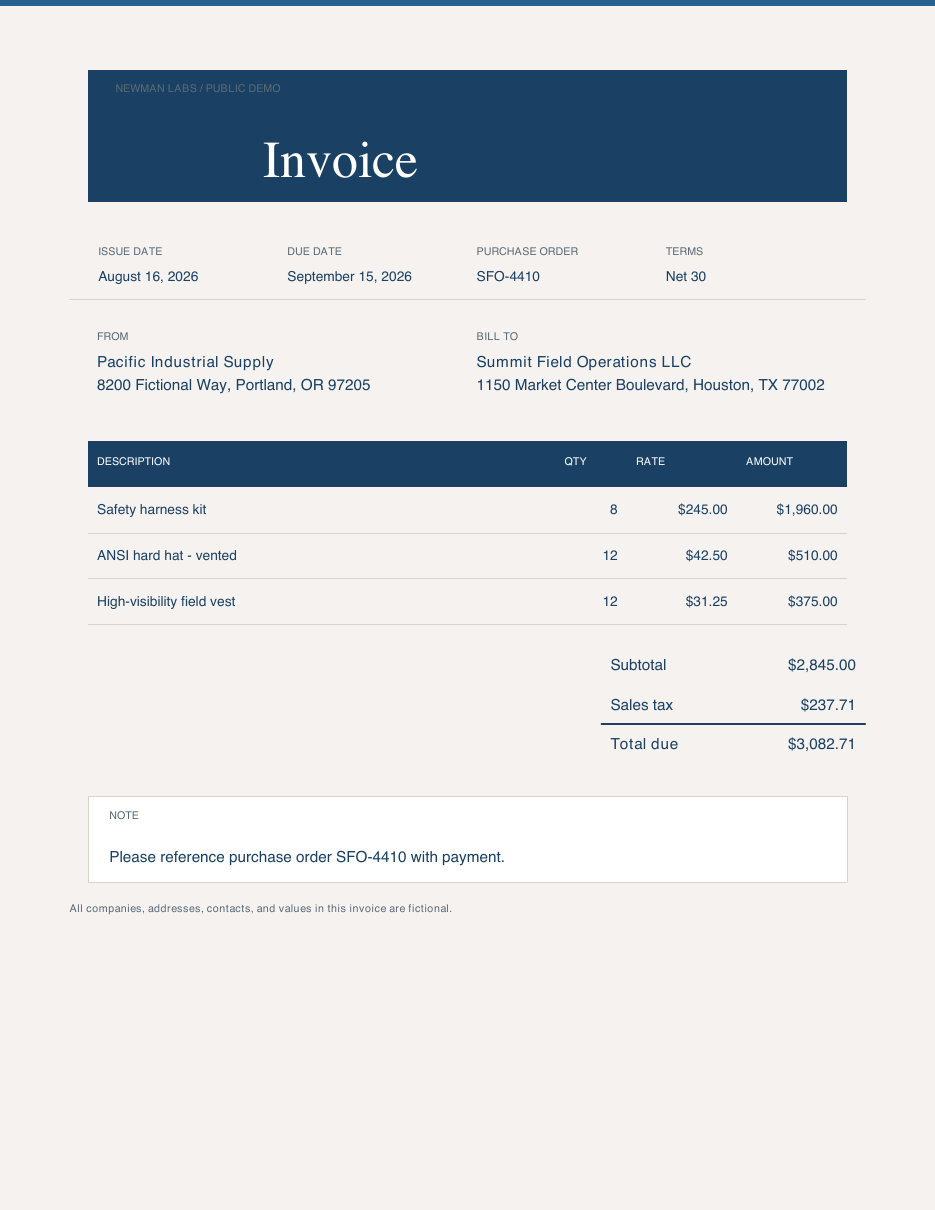
Synthetic US invoice
One familiar workflow with real failure modes
- 60 seconds. Show the document without apologizing for it being synthetic.
- Say: one familiar invoice with real failure modes. The printed seller is Pacific Industrial Supply, the fake ERP returns a single candidate, and Python accepts SUP-3007.
- Say: this is not an accounts payable platform. It is extraction, one tool call, validation, and review.
- Point at the preview and the four status rows, and open the PDF only if people in the back cannot read it. Then click to the upload path.
The live lab path
Drop a PDF. Get a typed invoice back.
Select or drop one invoice. Extraction starts immediately.
The managed job scans, reads, looks up the supplier, and validates.
You get the original PDF beside a typed invoice you can inspect.
- 45 seconds. This is the path you are about to click, not a platform diagram.
- Say: you drop a PDF, a job runs, and the browser comes back with the document plus a typed invoice. FastAPI starts it, Prefect keeps the long work durable, and that is all the architecture this slide needs.
- Point at the three boxes. Then click into the lab.
Live lab
Start with permanent demos. Upload when the room is ready.
One ERP candidate · SUP-3007
Open lab → 02Needs reviewTwo ERP candidates · no guessed match
Open lab → 03Your PDFLive managed scan, conversion, tool call, and extraction
Run extraction →- 8 to 12 minutes. This is where the time saved in the first half goes, so stay in the lab instead of the slides.
- Run Supplier match first: printed seller, the single ERP candidate, SUP-3007. Then Needs review: two candidates, a null supplier match, and an application that refuses to guess.
- Walk the PDF, Data, OCR/text, and JSON tabs. Upload a live PDF only if the wifi and the clock are cooperating.
- If a job runs slow, narrate the FastAPI and Prefect path while it finishes. Leave the room with the idea that a green schema does not prove the numbers are right, which is the next slide.
Pydantic validates structure, not reality.
total is a positive Decimalsupplier_match fits the schema- 75 seconds. Slow down here. If they remember one slide, it should be this one.
- Say: Pydantic validates structure, not reality. The total can be a positive Decimal and still be the wrong number on the page. A supplier match can satisfy the schema, while Python is the thing that checks it equals the single ERP candidate.
- Point at the four rows and let them sit for a beat.
- Click: that is why we test the code, evaluate the model, and trace the run.
Before release
Test the code. Evaluate the model.
After release
Trace the whole run
Prefect shows the job. Logfire connects application and model traces.
- 75 seconds on the slide, then a short live Logfire look if the room and wifi cooperate.
- Say: unit tests cover rules, totals, retries, and routes. FunctionModel lets CI drive exact Agent behavior without a live model. Evaluations score real models against labeled invoices over time.
- Say: after release, Prefect shows the job and Logfire connects the traces. Point along FastAPI, Prefect, Docling, Agent, typed result.
- Open Logfire and show one invoice_parser run. Do not tour the product. Prompts and document content are sensitive, and credentials never belong in telemetry. Next slide is the business rule.
Deterministic decision
One candidate continues. Ambiguity stops.
Use that supplier ID.
Continue →Return no supplier ID.
Human reviewPython applies the rule. The model never chooses among ambiguous records.
- 60 seconds. State the rule once and let the diagram carry it.
- Say: the model searches with the printed seller name, and Python makes the decision. One candidate means we use that ID. Zero or several means no supplier ID and a human review.
- Say: ambiguous ERP data is a data problem rather than a prompting problem, so retrying the model would not help.
- Point at the two paths and the line underneath, then click to the reusable sequence.
The model interprets. Python validates, integrates, and controls what happens next.
- 45 seconds. Read the pipeline left to right, then the sentence under it.
- Say: invoices are only the example. Tickets, contracts, claims, and reports have the same shape: unstructured input, inspectable evidence, a bounded model call, a typed result, Python, and then either an action or a review.
- Close on the line already printed on the slide: the model interprets, and Python validates, integrates, and controls what happens next.
- Click. Resist starting a second example this late.
Questions
What would you put beyond the chat?
The slides, synthetic invoices, live workflow, and source code are already public at the links on this slide.
Start with one model boundary you can explain, test, and defend.
- 90 seconds, then questions. Leave this slide up.
- Say: what would you put beyond the chat? Start with one model boundary you can explain, test, and defend.
- Point at the live lab, the GitHub repo, and the portfolio link. Thank the room and open the floor.
- If questions are slow to start, restate the rule: the application owns the loop, the model interprets, and Python decides.
←/→ navigate · P presenter · O overview · F fullscreen